Lomography LC-Wide review

Lomography LC-WideAnalogue camera specialist Lomography recently expanded its classic LC-A lineup when it unveiled the LC-Wide, featuring a new wide angle lens and a choice of picture formats. The original LC-A was first manufactured 27 years ago and was then replaced by the LC-A+ in 2006. Packing a considerable heritage, the LC-Wide may be the most modern snapper to join the lineup, but how does it compare to the LC-A+ and is it worth trading up?

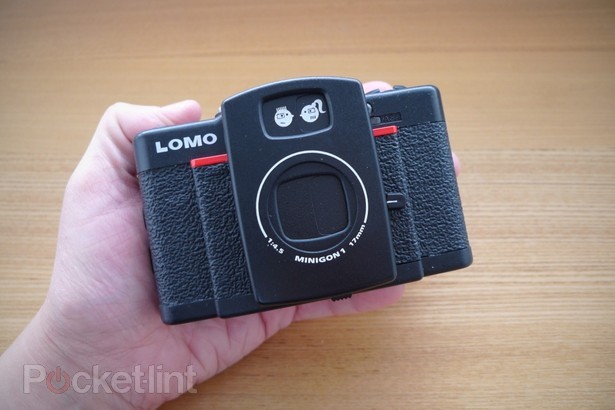
Measuring in at 108 x 68 x 44.5mm, the LC-Wide is pretty much the same size as its older sibling and feels just as sturdy in the hand. It tips the scales at 220g (not including the battery and film) which is more or less the same as the LC-A+. Although a fair bit larger than most modern digital cameras, the pleasingly chunky chassis is palm-sized so it won’t take up to too much room in your bag and its relative bulk actually means that it can be held far more comforably than many smaller cameras. The textured finish also means that there’s plenty of grip to keep it slipping from your hand and it also comes with a detachable wrist strip for extra safety.

In terms of looks, it boasts the same vintage asthetics as previous LC-A models with a few added touches to make it clear that this is an upgrade. The lens casing on the front of the camera is slightly wider to accomodate the new wide-angle 17mm lens, and the extra protrusion sports a thin red trim. Apart from these differences and a couple of very minor aesthetic additions (such as the text around the lens) the camera looks more or less the same as the LC-A+.

You can read the rest of the article here on Pocket-lint.com (originally published 21/06/11).

Lomography Sprocket Rocket review

Lomography Sprocket RocketAnalogue camera maker Lomography (or Lomo, to those in the know) has been driving the public’s desire for retro cameras for a while now. Following on from the sucess of its first product (the LC-A+) and it’s popular Diana F+ and Diana Mini models, the brand has introduced the Sprocket Rocket.

The latest addition to Lomo’s fast-expanding lineup of analogue snappers, the new model uses an extra-wide lens to capture panoramic shots and, as the name suggests, the camera uses the full size of the film including the sprocket holes and numbering at the edge. The additon of a rewind dial makes it possible for you to wind the film backwards as well as forwards between frames in order to get some really interesting effects. We recently reviewed the Lomo 360 Spinner – a 360-degree panoramic camera. While it’s a great piece of kit, it is slightly bulky and cumbersome, while the newer Sprocket Rocket offers panoramic pictures (albeit not full 360-degrees) in a much more compact product.

Some models in the Lomo range use 120mm film that’s notoriously hard to track down, unless you’re lucky enough to live near one of the Lomo stores. Thankfully, the Sprocket Rocket uses conventional 35mm variety that can be picked up easily from anywhere that sells camera film, such as the chemist. If you’re used to the simplicity of popping an SD card into your digital camera, then the idea of loading a film might sound mildly scary, not to mention ridiculously old-fashioned. Rest assured that getting your film in place is absolute child’s play on the Sprocket Rocket. All you need to do is remove the back door of the camera, lift the winding knob, pop the film in, attach to the take-up spool on the right and wind on slightly to make sure it’s firmly attached. If you follow the enclosed instructions, then you really can’t go wrong.

The camera itself is a thing of beauty, with its stylish black finish and 1940s styling, its looks like something out of a spy film or a Dick Tracy comic. Although predominantly plastic, the camera’s chassis is reassuringly sturdy, and certainly more robust that some of the brand’s cheaper models such as the Diana Mini.

You can read the rest of the article here on Pocket-lint.com (originally published 29/12/10).

Lomography Spinner 360 review

Lomography Spinner 360Analogue camera brand Lomography (or Lomo, for short) has fast been gaining popularity following the success of its first model – the Lomo LC-A+ – and subsequent Diana F+ and Diana Mini models, while the London shop has just celebrated its first anniversary. The Spinner 360 is the most recent addition to the brand’s arsenal of retro-styled cameras and, as the name suggests, is designed to take 360-degree panoramic images.

Unlike some models in the company’s range, which use relatively hard-to-find 120mm film, the Spinner uses conventional 35mm film that you can buy anywhere. For those of us that are used to digital snaps, loading camera film can seem slightly intimidating, but rest assured that the Spinner makes it absolutely child’s play. You simply pop the back open, lift up the rewind dial, put the film in, attach the spool to the sprocket and wind it a couple of times using the dial on the bottom.

Before shooting, you need to make sure that the aperture is switched to either the “cloudy” or “sunny” setting (depending how light the shooting conditions are). If you’re outside in the sun and using ISO 400 film then use the sunny setting, or if it’s cloudy then, yep, you’ve guessed it – use the cloudy setting. If you’re using ISO 100 or 200 or if you’re shooting inside (it’ll need to be a brightly lit room) then always use the cloudy setting. If you leave it on the rewind setting then you’ll end up with a blank roll of film and all of your photographic efforts will have been wasted.

There is a hotshoe on top of the camera but as there are no contact points, you won’t be able to use a conventional flash, but you can use a strobe flash or constant light source.

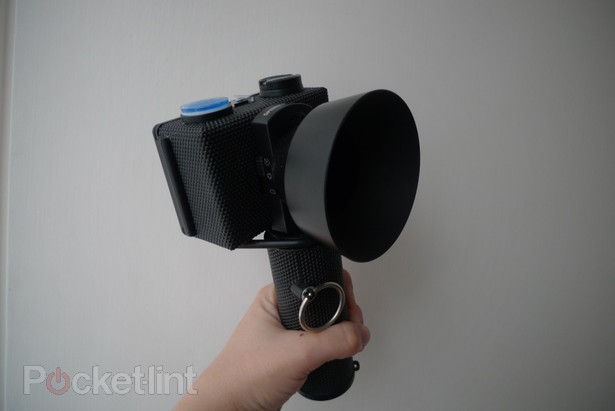
There’s a cool-looking 360-degree spirit level on top of the camera, featuring an image of a jumping dolphin (a Spinner is a type of Dolphin, if you hadn’t worked out the connection). This will help to you to line up your shot so that you get a complete panorama. The trick is to keep the camera steady, which may take a little bit of practice as the motion of pulling the cord out tends to jog the whole unit unless you’re careful. Or if you prefer, you can go off-piste and hold the camera at an angle if you want to experiment with your photos. Alternatively, if you want to guarantee a non-shaky picture, there’s a standard tripod mount on the base of the camera handle.

You can read the rest of the article here on Pocket-lint.com (originally published 05/10/10).